
DroidScript: JS and Python IDE2.80 - Google Play
You'll be able to see results in few seconds.
Publisher Description

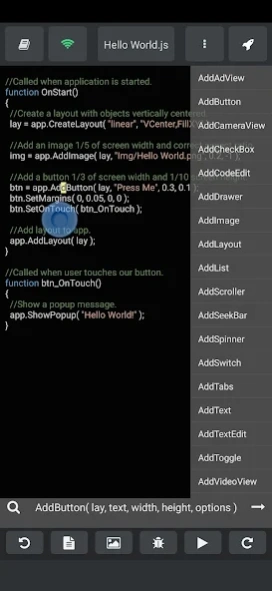


Rapid development of mobile apps, using JavaScript and Python
Easily write apps for your Phone, Tablet or Chromebook using industry standard JavaScript and Python. Edit your code using our browser based WiFi editor, or just edit code directly on your device using the built-in code editor. Now you can write apps anywhere!
Using this app is a great way to learn JavaScript and Python, which are now the most popular computer languages on the planet! It contains lots of clear and simple examples and comes with 'active' documentation and a large and friendly community who are ready to help.
DroidScript makes coding 10x faster and easier than using the standard Android API because we have done all the hard work for you and wrapped it up in our simplified API. This accelerates your development process and protects you from all the issues caused by differences in hardware and Android versions.
DroidScript uses Android's built-in Chrome V8 engine which is constantly updated and improved by Google and keeps up-to-date with modern internet standards.
For larger projects, we recommend using the built-in browser based IDE (editor). It connects via WiFi to your device allowing wire free coding from Windows, Linux or Mac PCs and it makes coding a breeze!
If you want to get serious about coding and release your apps on to Google Play then you can even build APKs and AABs directly on your device in a matter seconds!
You can choose to make Native apps, HTML apps, NodeJS apps or make Hybrid Apps using the built-in WebView control. Whichever way you choose, you can make use use of all the power of the modern Chrome browser engine in every type of app.
It's not just for beginners! Many professionals are using DroidScript all over the world and we can provide an 'enhanced support service' to help you build your commercial application. (Please contact support@droidscript.org for more info)
Features:
- Build apps for Android, Amazon Fire and ChromeBooks.
- Add Buttons, Text and Graphics.
- Access GPS, Compass, Camera, Accelerometer, Bluetooth, WiFi.
- Use native controls and/or HTML5 and CSS.
- Create background services and Schedule Jobs.
- Run NodeJS services and install NPM modules.
- Build games with Animations, Sound Effects and Physics.
- Make use of popular JavaScript libs such as JQuery.
- Control Arduino, ESP32, Raspberry Pi and many other gadgets.
- Build Kiosks, POS systems and Machine controllers.
- Share app source with your friends as .spk files.
- Create home-screen shortcuts to your apps.
- Built-in documentation.
- Works off-line and Online.
- Control GPIO and UART on embedded devices.
- Hundreds of samples and demos.
- Hundreds of plugins available.
- Thousands of NPM modules available.
- Extendable via our Plugin SDK
- New stuff being added all the time!
Already a Java coder? Why not boost your productivity and switch to DroidScript so that you can rapidly generate your UI and then extend DroidScript's functionality through our plugin mechanism.
Note:
DroidScript is maintained by droidscript.org which is a
not-for-profit
organisation. All of our revenue is used to pay for hosting services, equipment for our volunteers, or distributed to our part-time developers. If we ever get to the point where we have surplus revenue, then we will simply make the Premium service cheaper for everyone!
Please be kind and post issues and requests on the forum
Forum
instead of giving negative reviews.
Thank you.
Please rate this app if you like it!
About DroidScript: JS and Python IDE
The company that develops DroidScript: JS and Python IDE is droidscript.org. The latest version released by its developer is 2.80.
To install DroidScript: JS and Python IDE on your Android device, just click the green Continue To App button above to start the installation process. The app is listed on our website since 2026-09-15 and was downloaded 0 times. We have already checked if the download link is safe, however for your own protection we recommend that you scan the downloaded app with your antivirus. Your antivirus may detect the DroidScript: JS and Python IDE as malware if the download link to com.smartphoneremote.androidscriptfree is broken.
How to install DroidScript: JS and Python IDE on your Android device:
- Click on the Continue To App button on our website. This will redirect you to Google Play.
- Once the DroidScript: JS and Python IDE is shown in the Google Play listing of your Android device, you can start its download and installation. Tap on the Install button located below the search bar and to the right of the app icon.
- A pop-up window with the permissions required by DroidScript: JS and Python IDE will be shown. Click on Accept to continue the process.
- DroidScript: JS and Python IDE will be downloaded onto your device, displaying a progress. Once the download completes, the installation will start and you'll get a notification after the installation is finished.
Program Details
System requirements
Download information
Pricing
Version History
version 2.80
posted on 2026-09-15
- Updated ApkBuilder to target API 36
- Updated ApkBuilder to use Billing v8
- Fixed SAF file write truncation bug.
- Fixed app.CreateShortcut bug in APKs.
- Added new app.GetSafeArea() method with 'cutout' and 'system' option.
- Fixed app.EnableBackKey(false) in Android 16 APKs.
- Fixed Google Play warning about 16 KB memory page sizes.
- Improved SAF support in all file handling functions.
- app.ListPermissions( "all/storage/internal/external/usb" ) now returns use-able URIs.
version 2.80
posted on 2026-09-15
- Updated ApkBuilder to target API 36
- Updated ApkBuilder to use Billing v8
- Fixed SAF file write truncation bug.
- Fixed app.CreateShortcut bug in APKs.
- Added new app.GetSafeArea() method with 'cutout' and 'system' option.
- Fixed app.EnableBackKey(false) in Android 16 APKs.
- Fixed Google Play warning about 16 KB memory page sizes.
- Improved SAF support in all file handling functions.
- app.ListPermissions( "all/storage/internal/external/usb" ) now returns use-able URIs.
version 2.78
posted on 2025-08-06
- Added support for Android 'edge-to-edge' mode
- Added support for JS import statements.
- Added support for ESP32 microcontroller boards
- Added a new JS Obfuscater.
- Updated docs to include Python fixes.
- Improved startup performance.
- Updated targetSdkVersion to SDK 35
- Updated Google Play Billing Library to version 7.0.0
- Loads more bug fixes.
version 2.74
posted on 2024-09-25
- Added new Microcontroller programming extension!
- Added new Samples Tab with advanced filtering and extra Python samples.
- Fixed unreliability of Notification listener on some devices.
- Removed deep links and unused services from APK/AAB manifests.
- Various other bug fixes, please see Google Group or Forum.
version 2.70
posted on 2024-07-03
- New on-device FileBrowser to see your files in scoped storage.
- New Premium+ subs for making Cloud Services and publishing web apps.
- Updated UI components to v28.
- Added cfg.ESM to enable ES module imports.
- Added app.Import() and app.Include() methods.
- Fixed lots of bugs!
- See forum for full list - https://groups.google.com/u/1/g/androidscript
** WARNING: Just install over the existing version, otherwise Android's 'scoped storage' may cause your projects to be deleted ***
version 2.68
posted on 2024-02-16
- Official support added for Python apps!
- New Backup Option allows you to backup/restore your projects.
- Docs now support switching between Python and JavaScript.
- New "Allow Background Launch" option (keeps DS alive).
- New 'Command' context menu available when editing.
- See forum for full list - https://groups.google.com/u/1/g/androidscript
** WARNING: Just install over the existing version, otherwise Android's 'scoped storage' may cause your projects to be deleted ***
version 2.66
posted on 2023-12-02
- New 'AutoSize' option for layouts to handle device rotation.
- Added new 'ScratchPad' extension to device IDE.
- Support for Python apps in 'experiments' mode.
- Default AAB/APK target API is now 33.
- Better support for non-latin app titles.
- Support for full-screen mode in the WebView.
- See forum for full list - https://groups.google.com/u/1/g/androidscript
** WARNING: Just install over the existing version, otherwise Android's 'scoped storage' may cause your projects to be deleted ***
version 2.61
posted on 2023-03-30
- Powerful new File Manager extension for the wifi IDE.
- Export GameView based games for web server installation.
- New GameView physics object viewer mode.
- You can now build APKs with non-western characters in the app title.
- ES6 modules supported for NodeJs apps with cfg.NodeESM option.
- See forum for full list - https://groups.google.com/u/1/g/androidscript
** WARNING: Just install over the existing version, otherwise Android's 'scoped storage' may cause your projects to be deleted ***
version 2.50
posted on 2022-01-01
** WARNING: Do not un-install DroidScript, just install over instead, because Android 10 'scoped storage' may cause your projects to be deleted ***
- Added support for creating AAB files!
- Added new 'Node Native' app type (mix node and native).
- Added app.CreateNode() method
- Added Background Job support.
- Added new Chat tab to right side panel of mobile IDE.
- Added CustomTabs (thanks to Candlelight)
- Added CloudStore extension to the WiFi IDE
- And lots more, see forum for full list.
version 2.09
posted on 2021-05-04
- Added support for deep linking.
- Added support for the Android Job Scheduler.
- Easily create plugins with the new ide.MakePlugin method.
- Added Bugfixes for MUI CreateDataTable method.
- Added Fix for new projects created in Wifi IDE having old 'holo' look.
- Added new app.IsScoped() method to check for scoped storage.
- Improved look of WiFi IDE.
- Fixed various bugs.
- And lots more, see forum for full list.
Disclaimer
Official Google Play Link
We do not host DroidScript: JS and Python IDE on our servers. We did not scan it for viruses, adware, spyware or other type of malware. This app is hosted by Google and passed their terms and conditions to be listed there. We recommend caution when installing it.
The Google Play link for DroidScript: JS and Python IDE is provided to you by apps112.com without any warranties, representations or guarantees of any kind, so access it at your own risk.
If you have questions regarding this particular app contact the publisher directly. For questions about the functionalities of apps112.com contact us.
